Excel-Based Audit and Finance Automation for Modern Professionals
Extract data from PDFs, financial statements, and invoices directly into Excel. Maintain source references and improve audit trail transparency while working in your familiar spreadsheet environment. Designed for audit firms, accounting professionals, and finance teams.
Get startedPlays muted until you tap.
Five ways to snip data into Excel
SnipCell gives you targeted tools for every type of data extraction. Pick the right snip for the job and keep source references intact.
Text Snip
Extract text from PDFs, invoices, and documents directly into Excel cells. Capture paragraphs, labels, or single values while keeping links to the original source.
Built for Excel-centric audit and finance workflows
SnipCell gives auditors, accountants, and finance professionals the tools they need to work more efficiently with Excel and source documents.
Direct Excel Integration
SnipCell integrates directly into Microsoft Excel, allowing you to work in your familiar spreadsheet environment without switching tools or changing established processes.
Document Data Extraction
Extract numerical and textual data from PDFs, financial statements, invoices, and reports, then place it directly into Excel cells in a structured way.
Source References
Maintain clear traceability by linking extracted data back to original source documents, supporting internal reviews and audit documentation.
Reduced Manual Errors
By reducing manual copy-paste actions and improving visibility between data and documentation, SnipCell supports a more structured review process and clearer audit trails.
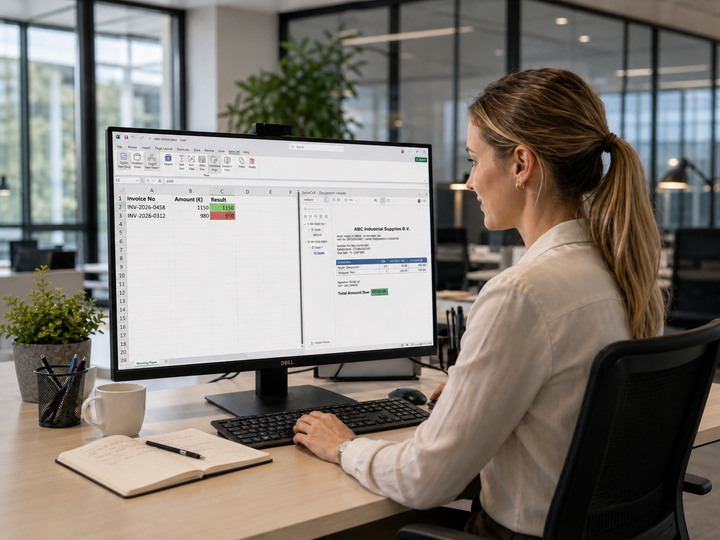
Transform your audit and finance workflows with SnipCell
- Work directly in Excel — no new platform to adopt
- Trace every number back to its source
- Reduce manual copy-paste and review faster
- Built for audit firms, finance teams, and professionals

14-day work trial No credit card required

Free for personal use. Business and Enterprise for work.
Individuals can use SnipCell Free for personal, non-work use. Work and organization use includes a 14-day trial with no card required, then choose Business for teams up to 5 users or Enterprise for larger organizations.
Free
For personal, non-work use
Includes:
- Personal documents and non-work use
- No subscription required
- Not valid for business or organization use
Business
Limited offer · 50% offFor teams and organizations
Includes:
- Licensed for professional and organization use
- Priority email support
- Cancel anytime
Enterprise
For organizations with complex requirements and large-scale deployments
Built for enterprise teams
Includes:
- Everything in Business
- Volume licensing
- Dedicated onboarding
- Priority enterprise support
Cancel anytime online. Your subscription stays active until the end of your current billing period.
Frequently Asked Questions
Have questions? We're here to help.
What file formats does SnipCell support for data extraction?
SnipCell supports PDF, Word (DOC, DOCX), and image formats (JPEG, PNG, BMP, TIFF, GIF). These cover the audit documents you typically work with, such as financial statements, invoices, reports, and scanned pages. Extracted data can be placed directly into Excel cells with references to the original source documents.
Does SnipCell require me to change my existing Excel workflows?
No, SnipCell is designed specifically for Excel-centric audit workflows. It integrates directly into Microsoft Excel, allowing you to continue working in familiar spreadsheets without switching tools or changing established processes.
How does SnipCell maintain source references between documents and Excel?
SnipCell links extracted values back to their original source documents. This linkage helps maintain transparency between source documents and Excel data, supports internal reviews and audit documentation, and reduces the need to manually search for original evidence.
Who is SnipCell for?
SnipCell is for anyone who works with documents in Excel. Whether you’re an individual managing receipts, tax documents, or personal finances, or part of an audit firm, accounting team, or finance department, SnipCell helps you move data into spreadsheets with clear source references. It scales from a few files to large volumes.
Does SnipCell replace professional judgment or audit standards?
No, SnipCell is designed to assist auditors by reducing manual copy-paste actions and making source references easily accessible. It supports a more structured review process and clearer audit trails, but does not replace professional judgment or audit standards.
How does SnipCell protect my data?
Documents you import are processed locally on your computer and are not uploaded to our servers.